# Problemas para ingresar

<figure><img src="/files/DsUiz3DI8ZkW77aG2x99" alt=""><figcaption></figcaption></figure>

<h2 align="center"><kbd>Problemas para ingresar</kbd></h2>

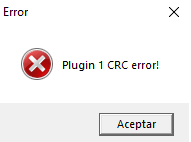
<p align="center">Al instalar e iniciar el juego en PCs con librerías desactualizadas, nos podemos encontrar con el problema "<code>Plugin 1 CRC error"</code>. Esto ocurre porque los archivos del cliente de juego no coinciden con la versión oficial del servidor debido a alteraciones del antivirus o a librerías faltantes.</p>

<figure><img src="/files/ohuZIWO0pqzWhl3yE5sI" alt=""><figcaption></figcaption></figure>

***

<h2 align="center"><kbd><mark style="color:red;"><strong>Solucion #1</strong></mark></kbd></h2>

<p align="center">Instalar las librerias correspondientes para ejecutar aplicaciones diseñadas en distintos lenguajes de programacion. Se encuentran en la raiz de instalacion de <strong>MuAscend</strong>, generalmente en <br><br><kbd>C:\Users\Deko\AppData\Local\Programs\Mu Ascend\Herramientas\Librerias</kbd></p>

<div data-with-frame="true"><figure><img src="/files/W0VGN4hhn3cNXXezp4f0" alt=""><figcaption></figcaption></figure></div>

***

<h2 align="center"><kbd><mark style="color:red;">Solucion #2</mark></kbd></h2>

<p align="center">El antivirus <code>Windows Defender</code> a menudo bloquea archivos esenciales del juego, ya que los ejecutables encriptados son detectados como posibles amenazas, aunque en realidad son falsos positivos. Para solucionar esto, basta con excluir la carpeta del juego sin desactivar el antivirus, ejecutando el archivo <code>'Agregar a Exclusiones.bat'</code> como administrador.</p>

<div data-with-frame="true"><figure><img src="/files/caVLmA0NcvYjQLEz64dd" alt="" width="563"><figcaption></figcaption></figure></div>

<p align="center">Una vez ejecutado el script simplemente abrimos nuestro <strong>Launcher</strong> y esperamos hasta que se carguen posibles archivos borrados por el antivirus.</p>


---

# Agent Instructions: Querying This Documentation

If you need additional information that is not directly available in this page, you can query the documentation dynamically by asking a question.

Perform an HTTP GET request on the current page URL with the `ask` query parameter:

```
GET https://muascend.gitbook.io/ascend-project/principal/problemas-para-ingresar.md?ask=<question>
```

The question should be specific, self-contained, and written in natural language.
The response will contain a direct answer to the question and relevant excerpts and sources from the documentation.

Use this mechanism when the answer is not explicitly present in the current page, you need clarification or additional context, or you want to retrieve related documentation sections.